
소득공제
외서
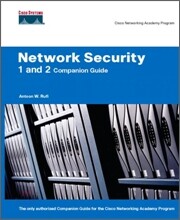
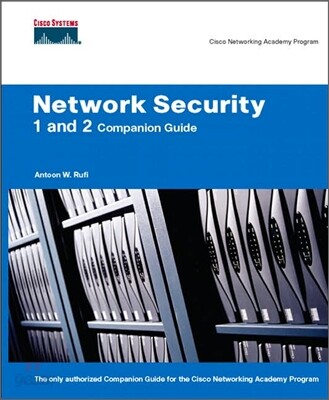
Network Security 1 And 2 Companion Guide
Cisco Networking Academy Program
Hardcover, 1ST
Cisco Press
2006.08.24.
이미 소장하고 있다면 판매해 보세요.
- 국내배송만 가능
- 문화비소득공제 가능
책소개
목차
|
Course 1
Chapter 1 Vulnerabilities, Threats, and Attacks Key Terms Introduction to Network Security The Need for Network Security Identifying Potential Risks to Network Security Open Versus Closed Security Models Trends Driving Network Security Information Security Organizations Introduction to Vulnerabilities, Threats, and Attacks Vulnerabilities Threats Attacks Attack Examples Reconnaissance Attacks Access Attacks Denial-of-Service (DoS) Attacks Masquerade/IP Spoofing Attacks Distributed Denial-of-Service Attacks Malicious Code Vulnerability Analysis Policy Identification Network Analysis Host Analysis Analysis Tools Summary Check Your Understanding Chapter 2 Security Planning and Policy Key Terms Discussing Network Security and Cisco The Security Wheel Network Security Policy Endpoint Protection and Management Host- and Server-Based Security Components and Technologies PC Management Network Protection and Management Network-Based Security Components and Technologies Network Security Management Security Architecture Security Architecture (SAFE) The Cisco Self-Defending Network Secure Connectivity Threat Defense Cisco Integrated Security Plan, Design, Implement, Operate, Optimize (PDIOO) Basic Router Security Control Access to Network Devices Remote Configuration Using SSH Router Passwords Router Privileges and Accounts Cisco IOS Network Services Routing, Proxy ARP, and ICMP Routing Protocol Authentication and Update Filtering NTP, SNMP, Router Name, DNS Summary Check Your Understanding Chapter 3 Security Devices Device Options Cisco IOS Firewall Feature Set Creating a Customized Firewall PIX Security Appliance Adaptive Security Appliance Finesse Operating System The Adaptive Security Algorithm Firewall Services Module Using Security Device Manager Using the SDM Startup Wizard SDM User Interface SDM Wizards Using SDM to Configure a WAN Using the Factory Reset Wizard Monitor Mode Introduction to the Cisco Security Appliance Family PIX 501 Security Appliance PIX 506E Security Appliance PIX 515E Security Appliance PIX 525 Security Appliance PIX 535 Security Appliance Adaptive Security Appliance Models PIX Security Appliance Licensing PIX VPN Encryption License Security Contexts PIX Security Appliance Context Licensing ASA Security Appliance Licensing Expanding the Features of the PIX 515E Expanding the Features of the PIX 525 Expanding the Features of the PIX 535 Expanding the Features of the Adaptive Security Appliance Family Getting Started with the PIX Security Appliance Configuring the PIX Security Appliance The help Command Security Levels Basic PIX Security Appliance Configuration Commands Additional PIX Security Appliance Configuration Commands Examining the PIX Security Appliance Status Time Setting and NTP Support Syslog Configuration Security Appliance Translations and Connections Transport Protocols NAT Dynamic Inside NAT Two Interfaces with NAT Three Interfaces with NAT PAT Augmenting a Global Pool with PAT The static Command The nat 0 Command Connections and Translations Manage a PIX Security Appliance with Adaptive Security Device Manager ASDM Operating Requirements Prepare for ASDM Using ASDM to Configure the PIX Security Appliance PIX Security Appliance Routing Capabilities Virtual LANs Static and RIP Routing OSPF Multicast Routing Firewall Services Module Operation FWSM Requirements Getting Started with the FWSM Verify FWSM Installation Configure the FWSM Access Lists Using PDM with the FWSM Resetting and Rebooting the FWSM Summary Check Your Understanding Chapter 4 Trust and Identity Technology Key Terms AAA TACACS RADIUS Comparing TACACS+ and RADIUS Authentication Technologies Static Passwords One-Time Passwords Token Cards Token Card and Server Methods Digital Certificates Biometrics Identity Based Networking Services (IBNS) 802.1x Wired and Wireless Implementations Network Admission Control (NAC) NAC Components NAC Phases NAC Operation NAC Vendor Participation Summary Check Your Understanding Chapter 5 Cisco Secure Access Control Server Key Terms Cisco Secure Access Control Server Product Overview Authentication and User Databases The Cisco Secure ACS User Database Keeping Databases Current Cisco Secure ACS for Windows Architecture How Cisco Secure ACS Authenticates Users User-Changeable Passwords Configuring RADIUS and TACACS+ with Cisco Secure ACS Installation Steps Administering Cisco Secure ACS for Windows Troubleshooting Enabling TACACS+ Verifying TACACS+ Failure Pass Configuring RADIUS Summary Check Your Understanding Chapter 6 Configure Trust and Identity at Layer 3 Key Terms Cisco IOS Firewall Authentication Proxy Authentication Proxy Operation Supported AAA Servers AAA Server Configuration AAA Configuration Allow AAA Traffic to the Router Authentication Proxy Configuration Test and Verify Authentication Proxy Introduction to PIX Security Appliance AAA Features PIX Security Appliance Authentication PIX Security Appliance Authorization PIX Security Appliance Accounting AAA Server Support Configure AAA on the PIX Security Appliance PIX Security Appliance Access Authentication Interactive User Authentication The Local User Database Authentication Prompts and Timeout Cut-Through Proxy Authentication Authentication of Non-Telnet, -FTP, or -HTTP Traffic Tunnel User Authentication Authorization Configuration Downloadable ACLs Accounting Configuration Console Session Accounting Command Accounting Troubleshooting the AAA Configuration Summary Check Your Understanding Chapter 7 Configure Trust and Identity at Layer 2 Key Terms Identity Based Networking Services (IBNS) Features and Benefits IEEE 802.1x Selecting the Correct EAP Cisco LEAP IBNS and Cisco Secure ACS ACS Deployment Considerations Cisco Secure ACS RADIUS Profile Configuration Configuring 802.1x Port-Based Authentication Enabling 802.1x Authentication Configuring the Switch-to-RADIUS Server Communication Enabling Periodic Reauthentication Manually Reauthenticating a Client Connected to a Port Enabling Multiple Hosts Resetting the 802.1x Configuration to the Default Values Displaying 802.1x Statistics and Status Summary Check Your Understanding 3 Chapter 8 Configure Filtering on a Router Key Terms Filtering and Access Lists Packet Filtering Stateful Filtering URL Filtering Cisco IOS Firewall Context-Based Access Control CBAC Packets Cisco IOS ACLs How CBAC Works CBAC-Supported Protocols Configuring Cisco IOS Firewall Context-Based Access Control CBAC Configuration Tasks Prepare for CBAC Setting Audit Trails and Alerts Setting Global Timeouts Setting Global Thresholds Half-Open Connection Limits by Host System-Defined Port-to-Application Mapping User-Defined PAM Defining Inspection Rules for Applications Defining Inspection Rules for IP Fragmentation Defining Inspection Rules for ICMP Applying Inspection Rules and ACLs to Interfaces Real-Time Streaming Protocol (RTSP) Protocols Required to Support IP Telephony DNS Inspection Summary Check Your Understanding Chapter 10 Configure Filtering on a Switch Key Terms Introduction to Layer 2 Attacks MAC Address, ARP, and DHCP Vulnerabilities Mitigating CAM Table Overflow Attacks MAC Spoofing: Man-in-the-Middle Attacks ARP Spoofing DHCP Snooping Dynamic ARP Inspection DHCP Starvation Attacks VLAN Vulnerabilities VLAN Hopping Attacks Private VLAN Vulnerabilities Defending Private VLANs Spanning Tree Protocol Vulnerabilities Preventing Spanning Tree Protocol Manipulation Summary Check Your Understanding Cours Chapter 1 Intrusion Detection and Prevention Technology Key Terms Introduction to Intrusion Detection and Prevention Network Based Versus Host Based Types of Alarms Inspection Engines Signature-Based Detection Types of Signatures Anomaly-Based Detection Cisco IDS and IPS Devices Cisco Integrated Solutions Cisco IPS 4200 Series Sensors Summary Check Your Understanding Chapter 2 Configure Network Intrusion Detection and Prevention Key Terms Cisco IOS Intrusion Prevention System (IPS) Origin of Cisco IOS IPS Router Performance Cisco IOS IPS Signatures Cisco IOS IPS Configuration Tasks Configure Attack Guards on the PIX Security Appliance Mail Guard DNS Guard FragGuard and Virtual Reassembly AAA Flood Guard SYN Flood Guard TCP Intercept SYN Cookies Connection Limits Configuring Intrusion Prevention on the PIX Security Appliance Intrusion Detection and the PIX Security Appliance Configuring Intrusion Detection Configuring IDS Policies Configure Shunning on the PIX Security Appliance Summary Check Your Understanding Chapter 3 Encryption and VPN Technology Key Terms Encryption Basics Symmetrical Encryption Asymmetrical Encryption Diffie-Hellman Integrity Basics Hashing Hashed Method Authentication Code (HMAC) Digital Signatures and Certificates Implementing Digital Certificates Certificate Authority Support Simple Certificate Enrollment Protocol (SCEP) CA Servers Enroll a Device with a CA VPN Topologies Site-to-Site VPNs Remote-Access VPNs VPN Technologies WebVPN Tunneling Protocols Tunnel Interfaces IPsec Authentication Header (AH) Encapsulating Security Payload (ESP) Tunnel and Transport Modes Security Associations Five Steps of IPsec Internet Key Exchange (IKE) IKE and IPsec Cisco VPN Solutions Summary Check Your Understanding Chapter 4 Configure Site-to-Site VPN Using Pre-Shared Keys Key Terms IPsec Encryption with Pre-Shared Keys Planning the IKE and IPsec Policy Step 1: Determine ISAKMP (IKE Phase 1) Policy Step 2: Determine IPsec (IKE Phase 2) Policy Step 3: Check the Current Configuration Step 4: Ensure the Network Works Without Encryption Step 5: Ensure ACLs Are Compatible with IPsec Configure a Router for IKE Using Pre-Shared Keys Step 1: Enable or Disable IKE Step 2: Create IKE Policies Step 3: Configure Pre-Shared Keys Step 4: Verify the IKE Configuration Configure a Router with IPsec Using Pre-Shared Keys Step 1: Configure Transform Set Suites Step 2: Determine the IPsec (IKE Phase 2) Policy Step 3: Create Crypto ACLs Step 4: Create Crypto Maps Step 5: Apply Crypto Maps to Interfaces Test and Verify the IPsec Configuration of the Router Display the Configured ISAKMP Policies Display the Configured Transform Sets Display the Current State of IPsec SAs Display the Configured Crypto Maps Enable debug Output for IPsec Events Enable debug Output for ISAKMP Events Configure a VPN Using SDM Configure a PIX Security Appliance Site-to-Site VPN Using Pre-Shared Keys Task 1: Prepare to Configure VPN Support Task 2: Configure IKE parameters Task 3: Configure IPsec Parameters Task 4: Test and Verify the IPsec Configuration Summary Check Your Understanding Chapter 5 Configure Site-to-Site VPN Using Digital Certificates Key Terms Configure CA Support on a Cisco Router Step 1: Manage the NVRAM Step 2: Set the Router Time and Date Step 3: Add a CA Server Entry to the Router Host Table Step 4: Generate an RSA Key Pair Step 5: Declare a CA Step 6: Authenticate the CA Step 7: Request a Certificate for the Router Step 8: Save the Configuration Step 9: Monitor and Maintain CA Interoperability Step 10: Verify the CA Support Configuration Configure a Cisco IOS Router Site-to-Site VPN Using Digital Certificates Task 1: Prepare for IKE and IPsec Task 2: Configure CA Support Task 3: Configure IKE Task 4: Configure IPsec Task 5: Test and Verify IPsec Configure a PIX Security Appliance Site-to-Site VPN Using Digital Certificates Enroll the PIX Security Appliance with a CA Summary Check Your Understanding Chapter 6 Configure Remote Access VPN Key Terms Introduction to Cisco Easy VPN Overview of the Easy VPN Server Overview of Cisco Easy VPN Remote How Cisco Easy VPN Works Cisco Easy VPN Server Configuration Tasks Task 1: Create an IP Address Pool Task 2: Configure Group Policy Lookup Task 3: Create ISAKMP Policy for Remote VPN Access Task 4: Define a Group Policy for a Mode Configuration Push Task 5: Create a Transform Set Task 6: Create a Dynamic Crypto Map with RRI Task 7: Apply Mode Configuration to the Dynamic Crypto Map Task 8: Apply a Dynamic Crypto Map to the Router Interface Task 9: Enable IKE Dead Peer Detection Task 10: (Optional) Configure XAUTH Task 11: (Optional) Enable the XAUTH Save Password Feature Cisco Easy VPN Client 4.x Configuration Tasks Task 1: Install the Cisco VPN Client 4.x on the Remote PC WebVPN WebVPN End-User Interface Configure WebVPN General Parameters Configure WebVPN Servers and URLs Configure WebVPN Port Forwarding Configure WebVPN E-Mail Proxy Configure WebVPN Content Filters and ACLs Summary Check Your Understanding Chapter 7 Secure Network Architecture and Management Key Terms Factors Affecting Layer 2 Mitigation Techniques Single Security Zone, One User Group, and One Physical Switch Single Security Zone, One User Group, and Multiple Physical Switches Single Security Zone, Multiple User Groups, and One Physical Swithc Single Security Zone, Multiple User Groups, Multiple Physical Switches Multiple Security Zones, One User Group, and One Physical Switch Multiple Security Zones, One User Group, Multiple Physical Switches Multiple Security Zones, Multiple User Groups, Single Physical Switch Multiple Security Zones, Multiple User Groups, Multiple Physical Switches Layer 2 Security Best Practices SDM Security Audit Router Management Center (MC) Hub-and-Spoke Topology VPN Settings and Policies Device Hierarchy and Inheritance Activities Jobs Building Blocks Supported Tunneling Technologies Router MC Installation Getting Started with the Router MC Router MC interface Router MC Tabs Basic Workflow and Tasks Simple Network Management Protocol (SNMP) SNMP Introduction SNMP Security SNMP Version 3 (SNMPv3) SNMP Management Applications Configure SNMP Support on a Cisco IOS Router Configure SNMP Support on a PIX Security Appliance Summary Check Your Understanding Chapter 8 PIX Security Appliance Contexts, Failover, and Management Key Terms Configure a PIX Security Appliance to Perform in Multiple Context Mode Enabling Multiple Context Mode Configuring a Security Context Managing Security Contexts Configure PIX Security Appliance Failover Understanding Failover Failover Requirements Serial Cable-Based Failover Configuration Active/Standby LAN-Based Failover Configuration Active/Active Failover Configure Transparent Firewall Mode Transparent Firewall Mode Overview Enable Transparent Firewall Mode Monitor and Maintain a Transparent Firewall PIX Security Appliance Management Managing Telnet Access Managing SSH Access Command Authorization PIX Security Appliance Password Recovery Adaptive Security Appliance Password Recovery File Management Image Upgrade and Activation Keys Summary Check Your Understanding Appendix A Check Your Understanding Answer Key Glossary |
품목정보
- 발행일
- 2006년 08월 24일
- 쪽수, 무게, 크기
- 800쪽 | 크기확인중
- ISBN13
- 9781587131622
사락 별점0
혜택 및 유의사항밑줄0
혜택 및 유의사항상품정보안내
직수입외서의 경우, 해외거래처에서 제공하는 정보가 부족하여 제목, 표지, 가격, 유통상태 등의 정보가 미비하거나 변경되는 경우가 있습니다. 정확한 확인을 원하시는 경우, 일대일 상담으로 문의하여 주시면 답변 드리겠습니다.
(판형과 판수 등이 다양한 도서는 찾으시는 도서의 ISBN을 알려 주시면 보다 빠르고 정확한 안내가 가능합니다.)
해외거래처에서 품절인 경우, 2차 거래선을 통해 유럽과 미국 출판사로 직접 수입이 진행될 수 있습니다.
수입 진행 시점으로 부터 2~3주가 추가로 소요되며, 해외에서도 유통이 원활하지 않은 도서는 품절 안내가 지연될 수 있습니다.
해당 경우, 문자와 메일로 별도 안내를 드리고 있사오니 마이페이지에서 휴대전화번호와 메일주소를 다시 한번 확인해주시기 바랍니다.
(판형과 판수 등이 다양한 도서는 찾으시는 도서의 ISBN을 알려 주시면 보다 빠르고 정확한 안내가 가능합니다.)
해외거래처에서 품절인 경우, 2차 거래선을 통해 유럽과 미국 출판사로 직접 수입이 진행될 수 있습니다.
수입 진행 시점으로 부터 2~3주가 추가로 소요되며, 해외에서도 유통이 원활하지 않은 도서는 품절 안내가 지연될 수 있습니다.
해당 경우, 문자와 메일로 별도 안내를 드리고 있사오니 마이페이지에서 휴대전화번호와 메일주소를 다시 한번 확인해주시기 바랍니다.
