
소득공제
수입
직수입양서
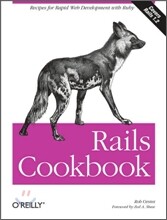
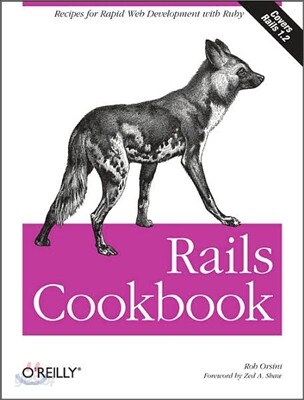
Rails Cookbook: Recipes for Rapid Web Development with Ruby
Recipes for Fapid Web Development witb Ruby
Paperback
Orsini, Rob
O'Reilly Media
2007.01.16.
이미 소장하고 있다면 판매해 보세요.
- 국내배송만 가능
- 해외 거래처 사정에 의하여 품절/지연 가능
- 도서 정보 중 미표기 사항 안내?
- 문화비소득공제 가능
책소개
목차
|
Foreword xi
Preface xiii Getting Started 1 Joining the Rails Community 2 Finding Documentation 4 Installing MySQL 5 Installing PostgreSQL 8 Installing Rails 10 Fixing Ruby and Installing Rails on OS X 10.4 Tiger 12 Running Rails in OS X with Locomotive 14 Running Rails in Windows with Instant Rails 16 Updating Rails with RubyGems 18 Getting Your Rails Project into Subversion 19 Rails Development 23 Creating a Rails Project 23 Jump-Starting Development with Scaffolding 26 Speeding Up Rails Development with Mongrel 28 Enhancing Windows Development with Cygwin 31 Understanding Pluralization Patterns in Rails 32 Developing Rails in OS X with TextMate 36 Cross-Platform Developing with RadRails 37 Installing and Running Edge Rails 38 Setting Up Passwordless Authentication with SSH 41 Generating RDoc for Your Rails Application 42 Creating Full-Featured CRUD Applications with Streamlined 45 Active Record 49 Setting Up a Relational Database to Use with Rails 50 Programmatically Defining Database Schema 54 Developing Your Database with Migrations 56 Modeling a Database with Active Record 60 Inspecting Model Relationships from the Rails Console 63 Accessing Your Data via Active Record 66 Retrieving Records with find 68 Iterating Over an Active Record Result Set 71 Retrieving Data Efficiently with Eager Loading 74 Updating an Active Record Object 77 Enforcing Data Integrity with Active Record Validations 81 Executing Custom Queries with find_by_sql 84 Protecting Against Race Conditions with Transactions 88 Adding Sort Capabilities to a Model with acts_as_list 92 Performing a Task Whenever a Model Object Is Created 97 Modeling a Threaded Forum with acts_as_nested_set 100 Creating a Directory of Nested Topics with acts_as_tree 104 Avoiding Race Conditions with Optimistic Locking 107 Handling Tables with Legacy Naming Conventions 109 Automating Record Timestamping 111 Factoring Out Common Relationships with Polymorphic Associations 112 Mixing Join Models and Polymorphism for Flexible Data Modeling 115 Action Controller 121 Accessing Form Data from a Controller 122 Changing an Application's Default Page 125 Clarifying Your Code with Named Routes 126 Configuring Customized Routing Behavior 127 Displaying Alert Messages with Flash 129 Extending the Life of a Flash Message 131 Following Actions with Redirects 133 Generating URLs Dynamically 134 Inspecting Requests with Filters 135 Logging with Filters 137 Rendering Actions 140 Restricting Access to Controller Methods 141 Sending Files or Data Streams to the Browser 142 Storing Session Information in a Database 144 Tracking Information with Sessions 146 Using Filters for Authentication 149 Action View 155 Simplifying Templates with View Helpers 156 Displaying Large Datasets with Pagination 158 Creating a Sticky Select List 161 Editing Many-to-Many Relationships with Multiselect Lists 163 Factoring Out Common Display Code with Layouts 166 Defining a Default Application Layout 169 Generating XML with Builder Templates 170 Generating RSS Feeds from Active Record Data 172 Reusing Page Elements with Partials 174 Processing Dynamically Created Input Fields 177 Customizing the Behavior of Standard Helpers 181 Creating a Web Form with Form Helpers 183 Formatting Dates, Times, and Currencies 187 Personalizing User Profiles with Gravatars 190 Avoiding Harmful Code in Views with Liquid Templates 191 Globalizing Your Rails Application 195 Restful Development 201 Creating Nested Resources 204 Supporting Alternative Data Formats by MIME Type 208 Modeling Relationships Restfully with Join Models 210 Moving Beyond Simple CRUD with Restful Resources 213 Consuming Complex Nested Rest Resources 217 Developing Your Rails Applications Restfully 220 Rails Application Testing 225 Centralizing the Creation of Objects Common to Test Cases 226 Creating Fixtures for Many-to-Many Associations 227 Importing Test Data with CSV Fixtures 229 Including Dynamic Data in Fixtures with ERb 232 Initializing a Test Database 233 Interactively Testing Controllers from the Rails Console 235 Interpreting the Output of Test::Unit 237 Loading Test Data with YAML Fixtures 238 Monitoring Test Coverage with rake stats 240 Running Tests with Rake 241 Speeding Up Tests with Transactional Fixtures 242 Testing Across Controllers with Integration Tests 244 Testing Controllers with Functional Tests 247 Examining the Contents of Cookie 250 Testing Custom and Named Routes 253 Testing HTTP Requests with Response-Related Assertions 255 Testing a Model with Unit Tests 256 Unit Testing Model Validations 259 Verifying DOM Structure with Tag-Related Assertions 261 Writing Custom Assertions 264 Testing File Upload 265 Modifying the Default Behavior of a Class for Testing by Using Mocks 269 Improving Feedback by Running Tests Continuously 271 Analyzing Code Coverage with Rcov 272 JavaScript and Ajax 277 Adding DOM Elements to a Page 278 Creating a Custom Report with Drag and Drop 281 Dynamically Adding Items to a Select List 286 Monitoring the Content Length of a Textarea 288 Updating Page Elements with RJS Templates 292 Inserting JavaScript into Templates 295 Letting a User Reorder a List 298 Autocompleting a Text Field 302 Searching for and Highlighting Text Dynamically 304 Enhancing the User Interface with Visual Effects 308 Implementing a Live Search 311 Editing Fields in Place 315 Creatingan Ajax Progress Indicator 317 Action Mailer 321 Configuring Rails to Send Email 322 Creating a Custom Mailer Class with the Mailer Generator 323 Formatting Email Messages Using Templates 325 Attaching Files to Email Messages 326 Sending Email from a Rails Application 327 Receiving Email with Action Mailer 328 Debugging Rails Applications 333 Exploring Rails from the Console 334 Fixing Bugs at the Source with Ruby -cw 336 Debugging Your Application in Real Time with the breakpointer 338 Logging with the Built-in Rails Logger Class 342 Writing Debugging Information to a File 344 Emailing Application Exceptions 346 Outputting Environment Information in Views 350 Displaying Object Contents with Exceptions 352 Filtering Development Logs in Real Time 353 Debugging HTTP Communication with Firefox Extensions 355 Debugging Your JavaScript in Real Time with the JavaScript Shell 356 Debugging Your Code Interactively with ruby-debug 360 Security 365 Hardening Your Systems with Strong Passwords 365 Protecting Queries from SQL Injection 368 Guarding Against Cross-Site Scripting Attacks 369 Restricting Access to Public Methods or Actions 371 Securing Your Server by Closing Unnecessary Ports 373 Performance 377 Measuring Web Server Performance with Httperf 378 Benchmarking Portions of Your Application Code 381 Improving Performance by Caching Static Pages 382 Expiring Cached Pages 385 Mixing Static and Dynamic Content with Fragment Caching 388 Filtering Cached Pages with Action Caching 391 Speeding Up Data Access Times with memcached 392 Increasing Performance by Caching Post-Processed Content 395 Hosting and Deployment 399 Hosting Rails Using Apache 1.3 and mod_fastcgi 400 Managing Multiple Mongrel Processes with mongrel_cluster 402 Hosting Rails with Apache 2.2, mod_proxy_balancer, and Mongrel 405 Deploying Rails with Pound in Front of Mongrel, Lighttpd, and Apache 409 Customizing Pound's Logging with cronolog 413 Configuring Pound with SSL Support 416 Simple Load Balancing with Pen 418 Deploying Your Rails Project with Capistrano 419 Deploying Your Application to Multiple Environments with Capistrano 423 Deploying with Capistrano When You Can't Access Subversion 425 Deploying with Capistrano and mongrel_cluster 427 Disabling Your Web Site During Maintenance 429 Writing Custom Capistrano Tasks 432 Cleaning Up Residual Session Records 436 Extending Rails with Plug-ins 439 Finding Third-Party Plug-ins 440 Installing Plug-ins 441 Manipulating Record Versions with acts_as_versioned 443 Building Authentication with acts_as_authenticated 446 Simplifying Folksonomy with the acts_as_taggable 450 Extending Active Record with acts_as 455 Adding View Helpers to Rails as Plug-ins 460 Uploading Files with file_column 462 Uploading Files with acts_as_attachment 465 Disabling Records Instead of Deleting Them with acts_as_paranoid 469 Adding More Elaborate Authentication Using the Login Engine 471 Graphics 475 Installing RMagick for Image Processing 475 Uploading Images to a Database 480 Serving Images Directly from a Database 484 Creating Resized Thumbnails with RMagick 485 Generating PDF Documents 488 Visually Displaying Data with Gruff 490 Creating Small, Informative Graphs with Sparklines 493 Migrating to Rails 1.2 497 |
관련 분류
- 카테고리 분류
품목정보
- 발행일
- 2007년 01월 16일
- 쪽수, 무게, 크기
- 534쪽 | 크기확인중
- ISBN13
- 9780596527310
사락 별점0
혜택 및 유의사항밑줄0
혜택 및 유의사항상품정보안내
직수입외서의 경우, 해외거래처에서 제공하는 정보가 부족하여 제목, 표지, 가격, 유통상태 등의 정보가 미비하거나 변경되는 경우가 있습니다. 정확한 확인을 원하시는 경우, 일대일 상담으로 문의하여 주시면 답변 드리겠습니다.
(판형과 판수 등이 다양한 도서는 찾으시는 도서의 ISBN을 알려 주시면 보다 빠르고 정확한 안내가 가능합니다.)
해외거래처에서 품절인 경우, 2차 거래선을 통해 유럽과 미국 출판사로 직접 수입이 진행될 수 있습니다.
수입 진행 시점으로 부터 2~3주가 추가로 소요되며, 해외에서도 유통이 원활하지 않은 도서는 품절 안내가 지연될 수 있습니다.
해당 경우, 문자와 메일로 별도 안내를 드리고 있사오니 마이페이지에서 휴대전화번호와 메일주소를 다시 한번 확인해주시기 바랍니다.
(판형과 판수 등이 다양한 도서는 찾으시는 도서의 ISBN을 알려 주시면 보다 빠르고 정확한 안내가 가능합니다.)
해외거래처에서 품절인 경우, 2차 거래선을 통해 유럽과 미국 출판사로 직접 수입이 진행될 수 있습니다.
수입 진행 시점으로 부터 2~3주가 추가로 소요되며, 해외에서도 유통이 원활하지 않은 도서는 품절 안내가 지연될 수 있습니다.
해당 경우, 문자와 메일로 별도 안내를 드리고 있사오니 마이페이지에서 휴대전화번호와 메일주소를 다시 한번 확인해주시기 바랍니다.
54,920원
총 1개
54,920원
