
이미 소장하고 있다면 판매해 보세요.
- 국내배송만 가능
- 문화비소득공제 가능
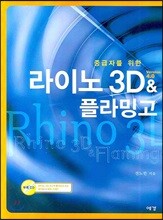
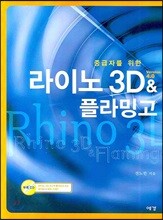
책소개
목차
|
머리말
■ 라이노 3D 1장 라이노 작업 시 생각해야 할 10가지 1. 작업시간의 단축 방법 2. Delete No! Hide Yes! 3. Idea Sketch는 손으로 그린다 4. Surface를 만들기 전에 Curve를 정리한다 5. Surface의 생성 시 Edge를 사용한다 6. 그리기 어려운 형태는 Project to Surface 명령으로 7. 물체는 여러 조각으로 나누어 생각한다 8. 물체 완성 전에 Surface를 정리한다 9. 정리된 Surface들의 이음 상태를 확인한다 10. Solid의 상태를 확인한다 2장 Edge 1. Edge의 위치 및 생성 2. Edge 자르기 (Split Edge) 3장 Curve 명령(Lines, Curve, Circle, Ellipse, Arc, Rectangle, Polygon) 1. Lines 2. Curve 3. Polygon 4장 Curve Tools 1. Blend Curves 2. Match Curve 3. Fillet corners 4. Adjustable curve blend 5. Offset curve on surface 6. Insert a control point, Remove a control point 5장 Surface 1. Extrude 2. Loft 3. Surface from Network of Curves 4. Sweep 1 Rail 5. Rail Revolve 6장 Curve from Object 1. Duplicate face border 2. Extract Isocurve 3. Contour 4. Create UV Curves, Apply UV Curves 5. Make 2-D Drawing 135 7장 Grouping, Point Editing 1. Group 2. Ungroup 3. Add to Group 4. Remove from Group 5. Points Off Selected 6. Edit Control Point Weight 8장 Transform 1. Copy 2. Orient: 2 Points, Orient: 3 Points 3. Remap to CPlane 4. Array 5. Project to CPlane 6. Twist, Bend 9장 Analyze 1. Analyze Direction 2. Surface Analysis 10장 Document Properties & Rhino Options 1. Mesh 2. Grid 3. Files 4. General ■ 플라밍고 1장 Lighting 1. 작업시간의 단축 방법 예제 - 머그잔 렌더링 2장 Render Properties 1. Resolution 2. Antialiasing 3. Special Effects 예제 - 화장품용기 렌더링 4. Ambient Light 5. Environment 예제 - 금속 재질 렌더링 3장 Materials 1. Material Library 2. Material Edit 예제 - 비치의자 렌더링 예제 - 모자 렌더링 4장 Image Mapping 1. Material Editor를 이용한 매핑 2. Decals를 이용한 매핑 ■갤러리 사각사각 네모네모 : 전노만 주얼리 렌더링전 학생 작품 |
저자 소개
저자 : 전노만
홍익대학교 미술대학 공예과를 졸업하고 이태리 밀라노 국립미술원(Brera) 졸업 후, (주) 터보테크 3D 조각기 사업부 디자인팀장, 홍익대학교 미술대학 금속조형디자인과 겸임교수를 역임했다. 현재는 장안대학 주얼리디자인과 겸임교수(CAD), 디자인그룹 수소의 대표로 재직 중이다.
품목정보
- 발행일
- 2007년 08월 06일
- 쪽수, 무게, 크기
- 280쪽 | 188*254*20mm
- ISBN13
- 9788970843537
사락 별점0
혜택 및 유의사항밑줄0
혜택 및 유의사항
23,750원
총 1개
23,750원
