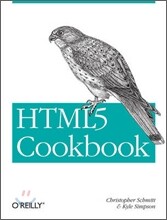

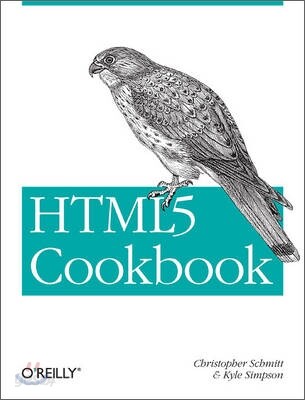
- POD (Publish On Demand) 도서로 표지재질, 제본상태 등이 일반 도서와 차이가 있을 수 있습니다.
이미 소장하고 있다면 판매해 보세요.
- 국내배송만 가능
- 해외 거래처 사정에 의하여 품절/지연 가능
- 도서 정보 중 미표기 사항 안내?
- 문화비소득공제 가능
책소개
목차
|
Chapter 1 : Fundamental Syntax and Semantics
Introduction Specifying the DOCTYPE Specifying the Character Set Specifying the Language Optimizing 〈script〉s and 〈link〉s Adding Document Structure with HTML5’s New Elements Choosing Between 〈article〉 and 〈section〉 Checking Your Document Outline Modifying the Document Outline Emphasizing Text Adding Importance to Text Highlighting Text for Reference Marking Up Small Print Defining Acronyms and Abbreviations Adding Links to Block-Level Content Marking Up Figures and Captions Marking Up Dates and Times Setting the Stage for Native Expanding and Collapsing Controlling the Numbering of Your Lists Hiding Content to Show Later Making Portions of a Page Editable Setting the Stage for Native Drag-and-Drop Chapter 2 : Progressive Markup and Techniques Introduction Adding More Semantic Meaning Picking a Markup Style Understanding Browser Support for HTML5 Making Internet Explorer Recognize HTML5 Elements Detecting HTML5 Features with JavaScript Using HTML5 Boilerplate Validating HTML5 Mapping HTML5 Elements to ID and Class Names Chapter 3 : Forms Introduction Displaying a Search Input Field Contact Information Input Fields Utilizing Date and Time Input Fields Number Inputs Selecting from a Range of Numbers Selecting Colors Creating an Editable Drop-Down Requiring a Form Field Autofocusing a Form Field Displaying Placeholder Text Disabling Autocomplete Restricting Values Making HTML5 Work in Older Browsers Validating Form Data in Older Browsers with JavaScript Example: Sample Form Chapter 4 : Native Audio Introduction Adding HTML5 Audio Manipulating the Audio Stream Generating 〈audio〉 Using JavaScript Visualizing 〈audio〉 Using 〈canvas〉 Sample Design: Custom Audio Player Chapter 5 : Native Video Introduction Adding HTML5 Video Ensuring Multi-Browser Video Support Setting Video Dimensions Displaying a Placeholder Image Before Video Plays Making Video Loop Sample Design: Manipulating Video with 〈canvas〉 Chapter 6 : Microdata and Custom Data Introduction Adding Microdata to Markup Using Microdata and Schema.org Adding Custom Data to Markup Accessing Custom Data with JavaScript Manipulating Custom Data Example: Creating a Map Application Using Custom Data Chapter 7 : Accessibility Introduction Writing Appropriate alt Text Descriptions Identifying Abbreviations and Acronyms Identifying Sections of a Page Using ARIA Landmark Roles Creating More Accessible Navigation Links Associating Form Fields with Their Labels Grouping Form Fields Logically Enabling a fieldset Dynamically Identifying Required Form Fields Using ARIA Live Regions to Announce When Dynamic Content Is Updating Chapter 8 : Geolocation Introduction Getting Basic Geolocation Data Getting Basic Geolocation Data with a Fallback Reverse Geocoding an Address with Latitude and Longitude Converting an Address into Latitude and Longitude Getting Directions from the Current Location Example: Starbucks to Starbucks Chapter 9 : 〈canvas〉 Introduction Drawing on a 〈canvas〉 Using Transparency Setting 〈canvas〉 Dimensions Using Gradients, Patterns, and Line Styles Pulling External Images into a 〈canvas〉 Drawing Setting Color Transformations Working with Geometric Transformations Placing Text on a 〈canvas〉 Clipping 〈canvas〉 Drawings Animating 〈canvas〉 Drawings Drawing Graphs with 〈canvas〉 Saving a 〈canvas〉 Drawing to a File Chapter 10 : Advanced HTML5 JavaScript Introduction Local Storage Application Caching Drag and Drop Web Workers Web Sockets History Local Files Appendix : HTML5 Resources Colophon |
저자 소개
저자 : Christopher Schmitt
Christopher Schmitt has been working on the Web since 1993. He is the principal of Heatvision.com, Inc., a new media design firm, and resides in Orlando, Florida. Christopher speaks frequently about web design at conferences including South by Southwest Interactive and Web Design World. His books include "Designing CSS Web Pages" (New Riders), "Professional CSS: Cascading Style Sheets for Web Design" (Wrox), and "CSS Cookbook" (O'Reilly).
저자 : Kyle Simpson
Kyle Simpson is a UI architect from Austin, TX. He is passionate about user experience, specifically optimizing the UI to be as responsive, efficient, secure, and scalable as possible.He considers JavaScript the ultimate language and is constantly tinkering with how to push it further. If something can't be done in JavaScript or web technology, he's bored by it.He has a number of open-source projects, including LABjs, HandlebarJS/BikechainJS, and flXHR, and he also is a core contributor to SWFObject.
관련 분류
품목정보
- 발행일
- 2011년 11월 28일
- 쪽수, 무게, 크기
- 260쪽 | 크기확인중
- ISBN13
- 9781449396794
사락 별점0
혜택 및 유의사항밑줄0
혜택 및 유의사항상품정보안내
직수입외서의 경우, 해외거래처에서 제공하는 정보가 부족하여 제목, 표지, 가격, 유통상태 등의 정보가 미비하거나 변경되는 경우가 있습니다. 정확한 확인을 원하시는 경우, 일대일 상담으로 문의하여 주시면 답변 드리겠습니다.
(판형과 판수 등이 다양한 도서는 찾으시는 도서의 ISBN을 알려 주시면 보다 빠르고 정확한 안내가 가능합니다.)
해외거래처에서 품절인 경우, 2차 거래선을 통해 유럽과 미국 출판사로 직접 수입이 진행될 수 있습니다.
수입 진행 시점으로 부터 2~3주가 추가로 소요되며, 해외에서도 유통이 원활하지 않은 도서는 품절 안내가 지연될 수 있습니다.
해당 경우, 문자와 메일로 별도 안내를 드리고 있사오니 마이페이지에서 휴대전화번호와 메일주소를 다시 한번 확인해주시기 바랍니다.
(판형과 판수 등이 다양한 도서는 찾으시는 도서의 ISBN을 알려 주시면 보다 빠르고 정확한 안내가 가능합니다.)
해외거래처에서 품절인 경우, 2차 거래선을 통해 유럽과 미국 출판사로 직접 수입이 진행될 수 있습니다.
수입 진행 시점으로 부터 2~3주가 추가로 소요되며, 해외에서도 유통이 원활하지 않은 도서는 품절 안내가 지연될 수 있습니다.
해당 경우, 문자와 메일로 별도 안내를 드리고 있사오니 마이페이지에서 휴대전화번호와 메일주소를 다시 한번 확인해주시기 바랍니다.
48,410원
총 1개
48,410원
