
이미 소장하고 있다면 판매해 보세요.
- 국내배송만 가능
- 문화비소득공제 가능
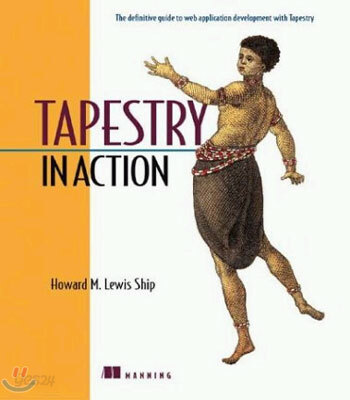
In Action
-
 Aspectj in Action: Practical Aspect-Oriented Programming 이동Aspectj in Action: Practical Aspect-Oriented Programming18% 65,870원
책소개
목차
|
foreword xvii
preface xix acknowledgments xxi about this book xxiii about the title xxvii about the cover illustration xxviii Part 1 Using basic Tapestry components 1 1 Introducing Tapestry 3 1.1 What are web applications? 5 1.2 What are Java servlets? 7 Understanding servlet multithreading 9 Managing server-side state 10 Using Struts with servlets 12 Understanding the limitations of servlets 12 1.3 Why do we need Tapestry? 16 What is a framework? 16 What is a component? 17 What is Tapestry? 18 Comparing Tapestry to Swing 21 1.4 Understanding Tapestry?goals 22 Simplicity 22 Consistency 22 Efficiency 23 Feedback 23 1.5 How does Tapestry work? 25 What?in a Tapestry application? 27 Tapestry?Model-View-Controller (MVC) pattern 29 Tapestry classes 33 1.6 Using Spindle 35 1.7 Summary 37 2 Getting started with Tapestry 38 2.1 Introducing the Hangman application 39 Determining the application flow 41 Creating page mockups 42 Defining the domain objects 44 Defining the pages 49 2.2 Developing the Home page 51 Understanding the Home page specification 52 Rendering the Home page 54 Defining the Home page class 57 Examining the Visit object 60 2.3 Implementing the Home page using standard servlets 62 2.4 Developing the Guess page 65 Displaying the remaining guesses 73 Generating the guessed word display 79 Selecting guesses 83 2.5 Developing the Win and Lose pages 89 2.6 Configuring the web.xml deployment descriptor 89 2.7 Summary 91 3 Tapestry and HTML forms 92 3.1 Understanding HTML forms 93 3.2 Creating a simple login form 96 Implementing the Login page class 99 Using specified properties 101 3.3 Understanding the Form component 103 Developing forms without Tapestry 103 Developing forms with Tapestry 105 Handling form submissions 108 3.4 Using basic form control components 109 Understanding the essentials 110 The Checkbox component 111 Radio and RadioGroup components 111 Select and Option components 113 Submit and ImageSubmit components 118 3.5 Creating a to-do list 120 Defining the data object 121 Creating the ToDo HTML template 122 Specifying properties in the page specification 125 Initializing the toDoList property 126 Handling reordering 127 Deleting completed items 128 Triggering stale links 129 3.6 Summary 132 4 Advanced form components 133 4.1 Introducing the advanced form components 134 4.2 Creating drop-down lists with PropertySelection 134 Adding priority levels to the ToDo application 136 Updating the HTML template 138 Implementing the page class 139 Implementing the model 140 Using enums instead of integers 144 4.3 Recording data in the form with Hidden 148 4.4 Looping within a form using ListEdit 151 Using the ListEditMap 153 Using ListEdit in the ToDo application 154 4.5 Handling file uploads 160 4.6 Creating pop-up date selections using DatePicker 165 4.7 Summary 168 5 Form input validation 169 5.1 Validating user input 170 Using FieldLabels in conjunction with ValidFields 173 Using validators 173 Using validation delegates 174 Using helper beans 178 5.2 Building the Register page 179 Creating the Register HTML template 181 Creating the Register page specification 189 5.3 Validating input based on regular expressions 195 5.4 Customizing label and field decorations 199 5.5 Enabling client-side validation 202 5.6 Handling form-level validations 205 5.7 Using validation without ValidField 208 5.8 Summary 211 Part 2 Creating Tapestry components 213 6 Creating reusable components 215 6.1 Creating simple template components 216 6.2 Creating the component specification 219 Specifying the component?Java class 219 Discarding the component?body 220 Forbidding informal parameters 221 Declaring parameters 222 Reserving names 230 6.3 Creating the Digit and Scaffold components 230 Specifying the digit parameter 232 Using the digit parameter 232 Creating the template 233 Using the Digit component 233 Using the Scaffold component 234 6.4 Creating the Letter component 234 Specifying the Letter component 235 Implementing the Letter component 236 Using the Letter component 237 6.5 Building the Spell component 238 Implementing the Spell component 239 Using the Spell component 240 6.6 Building the Border component 242 Creating the Border template 243 Creating the Border specification 244 Using the Border component 244 6.7 Creating interactive, reusable components 246 Introducing the Pet Store image map 246 Specifying the DirectArea component 247 Implementing the DirectArea component 248 Using the DirectArea component 252 6.8 Using component libraries 254 Declaring libraries 254 Referencing library components 256 6.9 Packaging components into libraries 261 Creating the library specification 262 Creating the library specification 264 Creating the FormError component 264 Using the FormError component 267 6.10 Summary 268 7 Tapestry under the hood 269 7.1 Processing requests 270 7.2 Understanding the application servlet 271 Servlet request processing 271 Understanding server-side state 272 Managing server-side state in a cluster 274 7.3 Understanding the Tapestry engine 277 7.4 Understanding engine services 279 What?the problem with application URLs? 279 How does Tapestry handle application operations? 280 Using the home service 281 Rendering pages with the page service 283 Linking to listener methods with the direct service 284 Creating bookmarkable links using the external service 290 7.5 Page rendering in detail 291 Using markup writers 292 Going beyond HTML 295 Understanding the page-rendering sequence 297 Using page-rendering events 297 7.6 Loading and pooling pages 299 Retrieving pages from the pool 300 Creating new page instances 302 Returning pages to the pool 304 7.7 Using persistent page properties 306 7.8 Using specified properties 308 7.9 Localizing Tapestry applications 309 Using Java localization 310 Using Tapestry?localization features 311 7.10 Summary 321 8 Advanced techniques 322 8.1 Creating new engine services 323 Defining a banner ad system 324 Defining the data model 326 Accessing the data model as an application extension 328 Implementing the BannerAd component 329 Implementing the banner service 332 Creating the library specification 336 Building a banner ad application 337 8.2 Client-side scripting 339 Defining the CreditCardField component 341 Working with the Body component 344 Creating the Tapestry script specification 345 Creating the CreditCardField specification 355 Creating the CreditCardField component 356 Using the component 368 8.3Integrating with JavaServer Pages 369 Redirecting to a JSP 369 Linking JSPs to Tapestry pages 371 Submitting JSP forms into Tapestry 375 8.4 Summary 379 Part 3 Building complete Tapestry applications 381 9 Putting it all together 383 9.1 Introducing the Virtual Library 384 9.2 Performing searches 385 Changing the table sort order 387 Paging through the results 387 9.3 Logging in and registering 388 9.4 Borrowing books 389 9.5 Getting details about books and persons 390 Viewing book details 390 Viewing a person 392 9.6 Managing your books 393 Editing a book 394 Deleting a book 395 Returning books 395 Adding a new book 396 Editing your profile 396 Giving away books 396 9.7 Administering the Virtual Library 399 Editing users 399 Editing publishers 400 Transferring books 400 9.8 Summary 402 10 Implementing a Tapestry application 403 10.1 Looking at the application layers 404 10.2 Organizing EJB access 406 Handling authentication 407 Accessing Enterprise JavaBeans 407 Tracking user identity with the Visit object 407 Understanding page inheritance 410 10.3 Implementing the Search page 413 Identifying application-specific components 415 Referencing the engine 416 Specifying the page class and properties 417 Performing searches 418 10.4 Implementing the BookMatches page 419 Handling paging and column sorting 420 Using the Browser component 425 Executing queries and re-queries 426 10.5 Implementing the Browser component 430 Specifying Browser?parameters 430 Getting results from the BookQuery bean 432 Rendering the Browser component 433 10.6 Implementing the ColumnSorter component 434 Creating the ColumnSorter HTML template 434 Specifying ColumnSorter parameters 435 Responding to the user 437 10.7 Implementing the Border component 438 Handling user login 442 Linking to MyLibrary 443 10.8 Authenticating the user 445 Remembering the user 446 Clearing the password field 447 Invoking the login operation 449 10.9 Creating bookmarkable links 449 Creating the BookLink component 450 Displaying the Book on the ViewBook page 451 Creating the PersonLink component 453 Displaying the Person 455 10.10 Editing a Book 457 Tracking the Book ID 459 Generating dynamic JavaScript 460 10.11 Giving books away 463 10.12 Editing the publishers 464 Constructing the EditPublishers template 464 Declaring properties for the EditPublishers page 465 Creating the ListEditMap 467 Updating the publishers 469 10.13 Editing the list of users 470 Creating the ListEditMap subclass 471 Handling the form submission 472 10.14 Creating the web deployment descriptor 474 Deploying web applications as root 476 Deploying an enterprise application as root 476 10.15 Wrapping it all up 477 A Getting involved with Tapestry 479 B Building the examples with Ant 485 C Tapestry component reference 493 D Tapestry specifications 516 index 537 |
저자 소개
Howard M. Lewis Ship
Howard M. Lewis Ship is the creator of Tapestry and remains the principal architect for the project. He has published two articles about Java web application development in The Java Report, a member of the Apache Jarkata project management committee, and was recently nominated to become a member of the Apache Software Foundation. He lives in Quincy, Massachusetts.
관련 분류
품목정보
- 발행일
- 2004년 03월 01일
- 쪽수, 무게, 크기
- 400쪽 | 크기확인중
- ISBN13
- 9781932394115
리뷰/한줄평0
상품정보안내
직수입외서의 경우, 해외거래처에서 제공하는 정보가 부족하여 제목, 표지, 가격, 유통상태 등의 정보가 미비하거나 변경되는 경우가 있습니다. 정확한 확인을 원하시는 경우, 일대일 상담으로 문의하여 주시면 답변 드리겠습니다.
(판형과 판수 등이 다양한 도서는 찾으시는 도서의 ISBN을 알려 주시면 보다 빠르고 정확한 안내가 가능합니다.)
해외거래처에서 품절인 경우, 2차 거래선을 통해 유럽과 미국 출판사로 직접 수입이 진행될 수 있습니다.
수입 진행 시점으로 부터 2~3주가 추가로 소요되며, 해외에서도 유통이 원활하지 않은 도서는 품절 안내가 지연될 수 있습니다.
해당 경우, 문자와 메일로 별도 안내를 드리고 있사오니 마이페이지에서 휴대전화번호와 메일주소를 다시 한번 확인해주시기 바랍니다.
(판형과 판수 등이 다양한 도서는 찾으시는 도서의 ISBN을 알려 주시면 보다 빠르고 정확한 안내가 가능합니다.)
해외거래처에서 품절인 경우, 2차 거래선을 통해 유럽과 미국 출판사로 직접 수입이 진행될 수 있습니다.
수입 진행 시점으로 부터 2~3주가 추가로 소요되며, 해외에서도 유통이 원활하지 않은 도서는 품절 안내가 지연될 수 있습니다.
해당 경우, 문자와 메일로 별도 안내를 드리고 있사오니 마이페이지에서 휴대전화번호와 메일주소를 다시 한번 확인해주시기 바랍니다.
